
How to Budget for Your First AWS Bill: A Realistic Starter Guide
How to Budget for Your First AWS Bill: A Realistic Starter Guide
Your first AWS bill can be a shock. You launch a simple web application, expecting minimal costs, only to receive an invoice for hundreds of dollars. This surprise stops many new ventures before they gain momentum. The core challenge is not the expense itself, but the inability to predict it. Without a clear forecast, you cannot budget effectively or make confident business decisions. This guide provides a realistic, step-by-step framework for a US-based founder to estimate and control initial AWS spending. You will learn how to translate technical architecture into a concrete monthly forecast, implement financial safeguards from day one, and avoid the common pitfalls that inflate early bills. We move beyond theoretical pricing to deliver an actionable budgeting methodology you can apply immediately.
Forecasting your first AWS bill requires a fundamental shift in thinking. You are not renting a fixed server. You are consuming a utility, similar to electricity or water. Your cost is the sum of dozens of individual services running for specific durations at published rates. An accurate estimate starts with mapping your planned application architecture to these services, then applying pricing logic to your expected usage patterns. A conservative initial budget for a basic, low-traffic web application in the US often falls between $50 and $150 per month. This assumes prudent service selection and the implementation of basic cost controls. The final amount depends entirely on your technical choices and operational discipline.
Understanding the AWS Pricing Philosophy
Amazon Web Services operates on a pay-as-you-go model. You pay only for the individual components you use, for the exact amount of time you use them. This granularity provides immense flexibility but also creates complexity in forecasting. Each service has its own pricing dimensions: compute is priced per second of runtime, storage per gigabyte-month, data transfer per gigabyte transferred out of the AWS network. This differs sharply from traditional hosting or platform-as-a-service (PaaS) models, like Shopify, which offer predictable, bundled monthly subscriptions. In those models, transaction fees or app costs might vary, but the core platform fee is fixed. With AWS, almost every variable can change.
This model makes initial budgeting an exercise in translation. You must translate your application’s requirements—”a website that handles 1,000 visitors a day and stores user uploads”—into specific AWS services and their corresponding usage metrics. Failure to do this translation is the primary reason for budget overruns. A developer might provision a more powerful server than necessary “to be safe,” not realizing the cost doubles with each step up in capability. Another might store backup files in the wrong storage class, incurring fees ten times higher than needed. Your first budget is a financial blueprint of your technical architecture.
Mapping Your Application Architecture to AWS Services
Before opening the AWS Management Console, you must define your technical stack. What services does your application absolutely require to function for its first users? This exercise forces prioritization and eliminates unnecessary complexity. A typical minimum viable product (MVP) for a web application includes four core components: compute, database, storage, and content delivery.
For compute, AWS Elastic Compute Cloud (EC2) is a common starting point. It provides virtual servers. Alternatively, AWS Lambda allows you to run code without managing servers, charging per request and compute time. For databases, Amazon Relational Database Service (RDS) manages databases like PostgreSQL or MySQL, or you might use Amazon DynamoDB for a NoSQL option. File storage is typically handled by Amazon Simple Storage Service (S3). To ensure global performance, Amazon CloudFront serves as a content delivery network (CDN) to cache and rapidly deliver static assets like images, CSS, and JavaScript files.
Your architectural choices directly dictate your cost profile. An EC2 instance runs 24/7, so you pay for every hour it is provisioned, regardless of traffic. A Lambda function, in contrast, incurs zero cost when idle. A DynamoDB table with provisioned capacity costs a fixed amount per hour, while one with on-demand capacity charges per read/write request. Creating this map is the first non-negotiable step in building your budget. For a deeper exploration of how these foundational services work, our guide What is AWS? A Beginner's Guide to Amazon Web Services provides essential context.
The Step-by-Step Forecasting Methodology
With your architecture mapped, you can now build a quantitative forecast. Follow this five-step process to create a line-item budget.
Step 1: Quantify Your Usage Assumptions
Begin with business and technical metrics. How many daily active users do you expect in month one? What is your estimated page views per user? How many database transactions per user action? How much data will each user upload? For a US-based startup targeting an initial niche, conservative assumptions are prudent. Example: 500 daily active users, 5 page views per user, 10 database reads/writes per session, and 50MB of user uploads per day. These figures become the multipliers for AWS service pricing.
Step 2: Select Specific Service Configurations
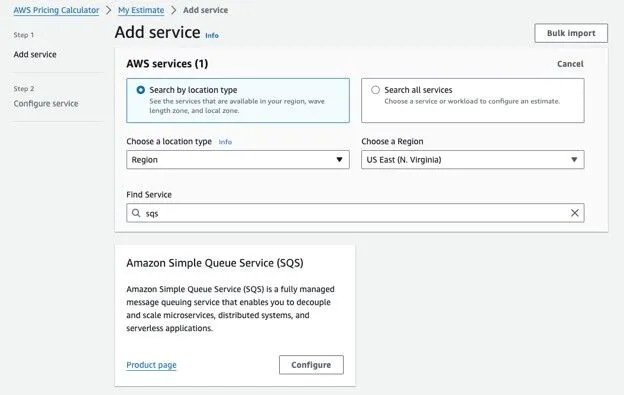
Now, choose the exact service tiers. For EC2, select an instance family and size (e.g., t3.micro, t3.small). For RDS, choose a db.t3.micro instance. For S3, decide on a storage class (Standard for frequently accessed data, Infrequent Access for backups). Use the AWS Simple Monthly Calculator or the modern AWS Pricing Calculator for this work. Do not guess; input the actual configurations you plan to use.
Step 3: Apply Pricing Formulas
Calculate each line item using the AWS pricing formulas and your usage assumptions from Step 1.
EC2: (Instance hourly rate) x (730 hours per month) = Monthly Compute Cost.
RDS: (Database instance hourly rate) x (730 hours per month) = Monthly Database Cost.
S3 Storage: (GB of data stored) x (Price per GB-month) = Monthly Storage Cost.
S3 Requests: (Number of GET/PUT requests) x (Price per 1000 requests) = Monthly Request Cost.
Data Transfer OUT to Internet: (GB of data transferred) x (Price per GB) = Monthly Transfer Cost. Data transfer IN is typically free.
Step 4: Incorporate Free Tier Benefits
The AWS Free Tier provides limited usage of many services free for 12 months. This is not a blanket waiver. It applies to specific tiers and quantities. A t3.micro EC2 instance offers 750 hours per month free. S3 offers 5GB of standard storage free. RDS offers 750 hours of a db.t3.micro instance free. In your forecast, apply these free allowances against your calculated usage. Only usage exceeding the free tier limits should appear in your paid budget.
Step 5: Build a Contingency Buffer
Your initial assumptions will be imperfect. Traffic may spike, or an inefficient query may increase database load. Industry best practice is to add a 25-50% contingency buffer to your calculated total. This buffer is not for carelessness; it is a financial acknowledgment of the uncertainty inherent in launching a new system. If your base forecast is $80, your working budget should be $100-$120.
Critical Cost Control Measures to Implement Immediately
A forecast is useless without controls to enforce it. These measures must be configured before you launch any workload.
1. Establish a Budget and Configure Alerts
AWS Budgets is the primary tool for cost management. On day one, create a monthly cost budget equal to your forecasted amount plus your contingency buffer. Then, configure alerts at 50%, 80%, and 100% of that budget. These alerts will notify you via email if spending accelerates faster than expected, giving you time to investigate before the bill arrives.
2. Implement IAM Policies and Permission Boundaries
Financial waste often stems from human error. A developer accidentally provisions a dozen large instances instead of one small one. Use AWS Identity and Access Management (IAM) to enforce the principle of least privilege. Create IAM policies that restrict the team’s ability to launch services outside your approved list or above your approved sizes (e.g., no EC2 instances larger than t3.medium). This creates a guardrail against costly mistakes.
3. Schedule Non-Production Resources
Development and testing environments do not need to run 24/7. Use AWS Instance Scheduler or simple Lambda functions to automatically stop EC2 and RDS instances in non-production accounts during nights and weekends. This simple practice can reduce your compute and database costs for those environments by 65-70% immediately.
4. Monitor and Analyze with Cost Explorer
AWS Cost Explorer provides granular visibility into your spending. From your first day of usage, review it weekly. Filter by service, by linked account, or by tags. This analysis helps you identify trends, confirm that your spending aligns with your forecast, and pinpoint any unexpected charges early. It turns your bill from a mystery into a diagnostic tool.
Common Pitfalls That Inflate Your First Bill
Even with a forecast and controls, specific mistakes routinely catch new users off guard.
Unmonitored Data Transfer Costs: Data transfer out of AWS to the public internet (e.g., to your users’ browsers) incurs a cost. While the first GB per month is often free, high-traffic sites serving large assets (videos, downloads) can see significant charges. Using CloudFront can reduce these costs through lower regional data transfer rates and caching.
Over-Provisioned Storage: Leaving old Amazon Machine Images (AMIs), unattached Elastic Block Store (EBS) volumes, or outdated S3 object versions accumulates silent storage costs. Implement lifecycle policies to automatically archive or delete this data.
Public S3 Buckets with Unintended Access: A misconfigured S3 bucket can become a public repository, leading to massive data transfer costs if its contents are linked elsewhere on the internet. Always verify bucket policies and use S3 Block Public Access settings.
Forgetting to Stop or Terminate Resources: An EC2 instance you used for a one-day test will continue billing you if it is merely “stopped.” An EBS volume attached to a terminated instance may persist. You must terminate resources to stop most compute-related charges. Develop a shutdown checklist for experiments.
The choice between a hands-on cloud platform like AWS and a managed service like Shopify often hinges on this very trade-off: cost predictability versus cost optimization. For a detailed analysis of this strategic decision, our comparison Shopify vs. AWS: How to Choose Based on Your Team's Tech Skills is an essential read.
Building Your First AWS Budget: A Practical Example
Let us construct a real-world forecast for “LocalArtisan,” a hypothetical US-based marketplace where artisans sell handmade goods. The MVP is a web application with user profiles, product listings, and image uploads.
Architecture Map:
Compute: AWS Lambda (Node.js functions for API).
Database: Amazon DynamoDB (on-demand capacity).
Storage: Amazon S3 (Standard storage for product images).
Content Delivery: Amazon CloudFront (for S3 images).
Additional: Amazon API Gateway (to manage API requests).
Monthly Usage Assumptions (Month 1):
Active Users: 500
API Requests/User Session: 20
Product Images Uploaded/Day: 100
Average Image Size: 2MB
Data Transfer Out (via CloudFront): 500GB
Monthly Cost Forecast:
| Service | Configuration | Usage Calculation | Monthly Cost (Est.) |
|---|---|---|---|
| AWS Lambda | 128MB memory, 1s avg. duration | 500 users 30 days 20 req = 300,000 requests. 300K req $0.20 per 1M req = $0.06. Compute: 300K req 1s 128MB/1024 = 37,500 GB-s. 37,500 GB-s $0.0000166667/GB-s = $0.63. | $0.69 |
| Amazon DynamoDB | On-demand capacity | 300,000 read request units, 150,000 write request units. (300K $0.25 per M) + (150K $1.25 per M) = $0.075 + $0.1875. | $0.26 |
| Amazon S3 | Standard Storage | 100 images/day 2MB 30 days = 6,000MB stored avg (6GB). 6GB $0.023/GB = $0.14. PUT requests: 3,000 $0.005/1000 = $0.02. GET requests: 15,000 $0.0004/1000 = $0.01. | $0.17 |
| Amazon CloudFront | Data Transfer Out | 500GB $0.085/GB (US/Canada rate) = $42.50. | $42.50 |
| Amazon API Gateway | HTTP API | 300,000 requests $1.00 per 1M req = $0.30. | $0.30 |
| Total Base Forecast | $43.92 | ||
| Free Tier Application | Lambda: 1M req free. DynamoDB: 25 GB storage free. S3: 5GB & 20K GET free. | -$0.00 (All usage within free tier except CloudFront) | |
| Forecast After Free Tier | $43.92 | ||
| Contingency Buffer (50%) | For traffic spikes and estimation error. | $21.96 | |
| Total Working Budget | ~$66.00 |
This example reveals key insights. First, the serverless architecture (Lambda, DynamoDB) keeps compute costs extremely low at this scale, as you pay only for actual execution. Second, data transfer via CloudFront is the dominant cost driver, highlighting the importance of optimizing image sizes and leveraging caching. Third, the Free Tier effectively covers all non-CDN costs for this initial scale. Your final bill may vary, but this methodology provides a defensible, transparent starting point.
Advanced Considerations for Scaling Your Budget
Your initial budget is a snapshot. As your user base grows, your cost model will evolve. Proactive planning prevents future surprises.
Cost Allocation Tags: Implement a tagging strategy from the outset. Assign tags like `Environment:Production`, `Project:LocalArtisan`, and `CostCenter:Marketing` to every resource. This allows you to use Cost Explorer to attribute spending accurately to different projects or departments, a critical capability as your organization grows.
Reserved Instances and Savings Plans: If your architecture uses steady-state EC2 or RDS instances, committing to one- or three-year terms can save 30-70% compared to On-Demand pricing. AWS offers Savings Plans for flexible, committed spending on compute usage. These are advanced tools, but you should be aware of them as your monthly spend crosses the $500-$1000 threshold.
Regular Review and Optimization Cycles: Budgeting is not a one-time event. Schedule a monthly finance review where you examine Cost Explorer reports, identify the top three cost drivers, and ask if each is optimized. Could a different instance type provide the same performance for less? Are there unattached storage volumes? This continuous improvement cycle is where significant long-term savings are found.
Understanding these operational and financial nuances is part of the total cost of ownership for a cloud-native business. For a broader view that compares this path with alternative e-commerce models, refer to our parent pillar, Online Business Pricing & Costs: Shopify, AWS, and Your Complete Buying Guide.
Conclusion: From Forecast to Financial Control
Budgeting for your first AWS bill transforms cloud adoption from a leap of faith into a managed business process. The shock of the unknown invoice is replaced by the confidence of a validated forecast. You achieve this by methodically mapping your application to services, quantifying usage, applying pricing, and, most importantly, implementing financial guardrails before you deploy a single resource. The AWS cloud offers unparalleled power and flexibility, but that power demands financial discipline. By adopting the forecasting methodology and cost controls outlined here, you ensure that your AWS investment scales predictably alongside your business, providing a stable foundation for growth rather than a source of budgetary anxiety.
Begin your cloud journey with clarity. Use the AWS Pricing Calculator today to build your first line-item forecast. Establish your AWS Budget with alerts before launching any workload. This proactive approach is the definitive first step toward mastering your cloud finances.
Frequently Asked Questions
### What is a realistic budget for a very simple, low-traffic website on AWS?
A basic static website hosted on Amazon S3 and delivered via CloudFront can cost under $5 per month for very low traffic (under 5,000 visitors). Adding a simple serverless API with Lambda and DynamoDB for dynamic functionality might increase this to $20-$50 per month, depending heavily on data transfer volume. The key is leveraging the Free Tier and serverless services that charge only for actual use.
### How does the AWS Free Tier work, and what are its biggest limitations?
The Free Tier offers limited quantities of over 100 products free for 12 months from your sign-up date, plus some “always free” offers. Its biggest limitation is that it is not universal; each service has specific limits (e.g., 750 hours of a t3.micro EC2 instance). If you provision a larger instance, you immediately incur full charges. Also, charges for usage beyond the free tier limits are not prevented—you will be billed for them automatically.
### Can I set a hard spending limit to prevent an unexpectedly high bill?
AWS does not offer a traditional hard spending cap that automatically shuts off services. The closest equivalent is using AWS Budgets to create an “action budget” that can trigger automated actions through AWS Lambda, such as stopping EC2 instances or deleting SNS topics, when a threshold is crossed. Still, configuring this requires technical expertise and is not a default setting.
### Why are data transfer costs often the hardest to estimate?
Data transfer costs are difficult to predict because they depend on unpredictable user behavior—how much data each user downloads, how many users visit, and from which global regions. A page with many large images or video content can generate 10-100 times more data transfer than a text-heavy page with the same number of visitors. Using a CDN like CloudFront and optimizing asset sizes are critical for controlling this variable.
### When should I consider moving from AWS to a simpler platform like Shopify?
Consider a managed platform like Shopify if unpredictable infrastructure costs and the operational overhead of managing servers, databases, and security patches are diverting critical focus from your core business—selling products. If your team lacks DevOps expertise and your primary need is a standardized, full-featured online store with predictable monthly fees, the trade-off in flexibility for simplicity and cost predictability can be the correct strategic decision. Our analysis in Shopify vs. AWS: A Complete Guide to E-commerce & Cloud Services explores this in detail.
References
– AWS Pricing Calculator
– AWS Free Tier Details
– AWS Cost Management – AWS Budgets
– AWS Cost Management – AWS Cost Explorer
– AWS Instance Scheduler
– Amazon S3 Pricing
– Amazon CloudFront Pricing